

Introducing the "Holy Trinity" Methodology
The "Holy Trinity" Methodology is the antidote to broad, expensive retail traffic. It is a precise filtering system designed to target the exact intersection of the three critical seller motivations visualized on the left.
Instead of casting a wide net for anyone looking to sell, we engineer our campaigns to only capture sellers who are experiencing genuine timeline pressure (Need), prioritizing speed and certainty over maximum value (Cash), and demanding a frictionless transaction without making any repairs (As-Is).
This narrow intersection is where high-equity, off-market deals will start stacking up and you will talk to less sellers while making more money.
Why Wholesalers Go Broke
(The "Retail Trap")
The "Retail Trap" is the primary reason wholesalers fail with Google Ads. By bidding on broad, generic keywords like "sell my house," you are unknowingly entering a bidding war against billion-dollar giants like Zillow and OpenDoor who can afford to pay premium prices for "retail" leads as well as agents and noob wholesalers.
These clicks flood your CRM with homeowners seeking full market value, forcing your team to waste countless hours churning through unmotivated callers just to find a single deal.
The math is a death spiral: you spend thousands acquiring leads that have no intention of selling at a discount. To survive, you must stop paying for "curiosity" and start strictly filtering for the specific distress signals that indicate a true motivated seller potential.

The "Honeypot" IP Blacklist
Use this Image with Text block to balance out your text content with a complementary visual to strengthen messaging and help your students connect with your product, course, or coaching. You can introduce yourself with a profile picture and author bio, showcase a student testimonial with their smiling face, or highlight an experience with a screenshot.

7 Negative Keyword Lists
We don't just guess at negative keywords; we use a structured, 5-layer exclusion protocol to purify your traffic:
-
The Competitor Shield: A massive list of over 600 national and regional wholesaler brand names (e.g., "HomeVestors," "Offerpad," "ASAP Cash Offer") to ensure you never pay for someone else's brand traffic. Brand traffic is prone to click fraud (wasted money.)
-
The Retail Purge: Comprehensively blocks high-price intent terms like "Zestimate," "MLS," "Realtor," "For Sale," and "Market Value" to filter out sellers expecting a retail exit.
-
The Curiosity Filter: Eliminates informational "tire-kickers" using prefixes like "How to," "When will," and "What is," ensuring you only pay for transaction-ready searchers. These add click-bloat, more wasted money.
-
The Career & Education Block: Filters out job seekers and students searching for "real estate salary," "wholesaling courses," "licensing schools," or "hiring."
-
The Legal & Tenant Screen: Stops budget waste on non-owner traffic searching for "eviction laws," "tenant rights," "Section 8 approval," or legal aid.
Example Featured Products
Showcase other available courses, bundles, and coaching products you’re selling with the Featured Products block to provide alternatives to visitors who may not be interested in this specific product.

Example Curriculum
- 2.1 - Use Google Maps To Understand The "Geographic Brain" of Google (10:09)
- 2.2 - Targeting County VS City VS Sub-Cities VS Satellite Cities VS Zip Codes (9:36)
- 2.3 - Setting up "Out of Country" and "Out of State" geo exclusions to stop fraud and irrelevant clicks (8:47)
- 2.4 - The Semi-National Campaign Structure: The technical structure for adding bulk locations (5:08)
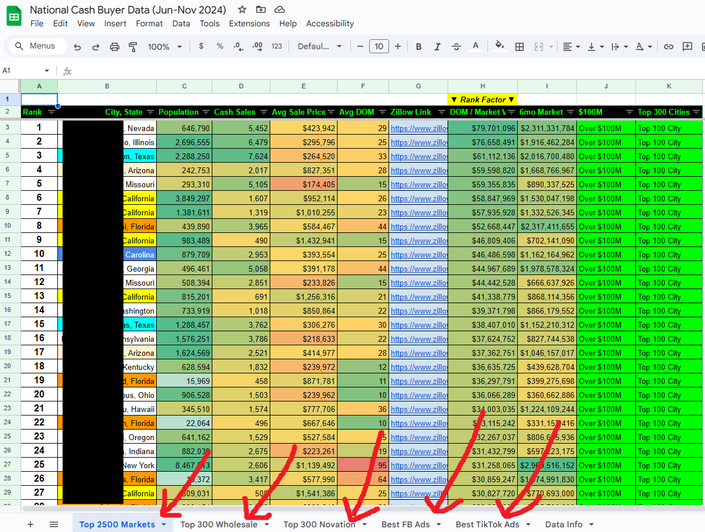
- 2.5 - Automate Sub/Satellite Cities w/AI & Google Sheets (Gemini 3) (13:49)
- 2.6 - Double/Tripple Checking "Laser Precision" Of Sub/Satellite Cities (7:34)
- 2.7 - Sniper "Single Search" Stubborn Neighborhoods/Zip Codes (2:21)
- 2.8 - How To "Keep Your List" Of AI + Sniper Locations (9:28)
- 2.9 - Cleaning Up "County Mapping" In PMAX/Demand Gen (That was supposed to be cities/neighborhoods) (4:45)
- 3.1 - The "As-Is" & "Ugly" Intersection: Navigating trademark issues while bidding on the intent of "Ugly House" searches. (4:39)
- 3.2 - [40 min] "Cash Keywords" Setup (Do this one 1st, to save time) (41:47)
- 3.3 - [5 min] "Need To" Keyword Setup (If making an ad group, for the 3x holy trinity) (4:38)
- 3.4 - [8 min] "AS IS" Keyword Setup (If making an ad group, for the 3x holy trinity) (8:41)
- 3.4 - [15 Min] Match Type Matters: Why we use Exact Match for "Holy Trinity" terms and Phrase Match for research. (14:42)
- 3.5 - [15 min]Holy Trinity: What Makes This Expensive and Powerful (13:21)
- 3.6 - How To Setup Advanced Ads (Snippets, Callouts, Sitelinks, etc) (20:47)
- 5.1 - The Wholesaler Plague: Understanding "Competitor Click Fraud" and why your budget drains at 9 AM.
- 5.2 - Implementing the IP Blacklist: Step-by-step upload of the "Honeypot" list (500+ IPs) to block known clickers.
- 5.3 - The "People IN" Setting: The critical location setting change that saves 20% of your budget instantly. (5:18)
- 5.4 - Microsoft Clarity: Over-the-Shoulder Recordings of All Visitors (Any Website) (11:16)
- 6.1 - How Keywords (Search Terms) Effect Conversion Rates
- 6.2 - How Website Speed Effect CVR (Clicks to Leads)
- 6.3 - How Website Layout Effect CVR (Clicks to Leads)
- 6.4 - How Website Forms Effect CVR (Clicks to Leads)
- 6.5 - How Speed-To-Lead (Automations) Effect CVR (Leads To Deals)
- 6.6 - Systems & Processes That Increase Conversion Rates (Leads To Deals)
- 6.7 - Monetizing Leads In 5 Unique Ways
- 7.1 - The Pixel vs. The Server: Why browser tracking is dying and how to set up basic conversion actions.
- 7.2 - The "Ramp Up" Timeline: Managing expectations for Weeks 1-4 (The "Learning Phase" Tax).
- 7.3 - Bidding Strategies: When to use "Maximize Clicks" (Launch) vs. "Target CPA" (Scale).
- 7.4 - How To Increase Daily Budget (Without Stalling The Algorithm)
- 7.5 - Offline Conversion Tracking (OCT): The "Secret Weapon"—uploading your closed deals back to Google to train the AI.